
Collaborate Live
Edit together with presence, shared cursors, comments, suggestions, and role-aware sharing.
Write together live, review comments and suggestions, restore safe versions, connect Google Workspace and Microsoft 365, and bring reviewable agent workflows into open, versionable files.
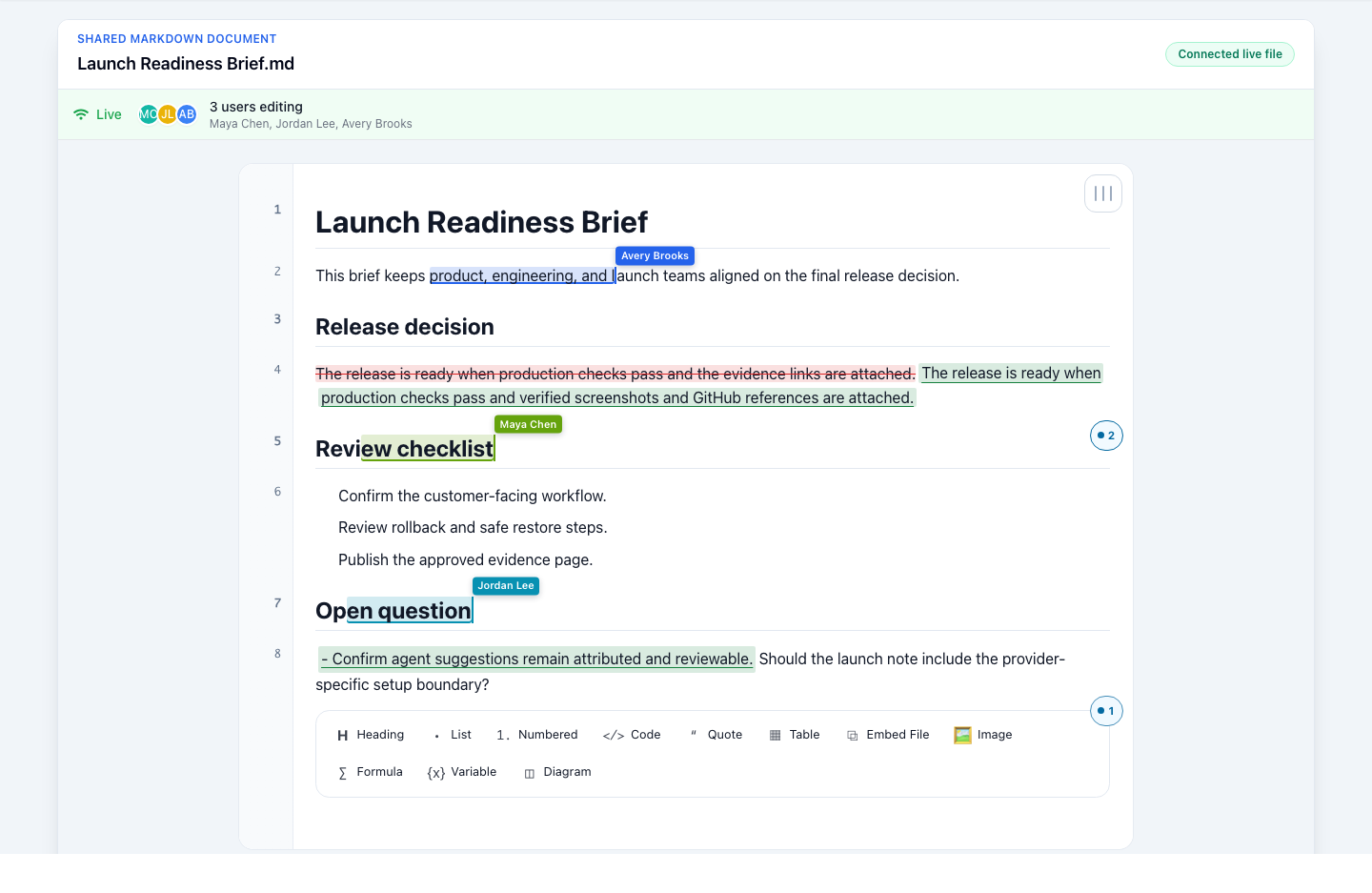
Live collaboration
People can edit the same live file from web, VS Code, macOS, and iOS with connected presence, labeled cursors, comments, and suggestions. Controls differ by surface.
One connected workflow
GPDoc combines the team controls expected from a document platform with open files that remain usable across editors, devices, Git, and cloud systems.
Edit together with presence, shared cursors, comments, suggestions, and role-aware sharing.
Add attributed comments and suggestions, then use version history and safe restore when needed.
Move documents and slides through Google Docs, Google Slides, Word, and PowerPoint workflows.
Keep configured-agent comments, suggestions, and file changes visible in GPDoc and Git.
Carry one open GPDoc file model across web, macOS, iOS, VS Code, and Cursor.
GPEditor proof
GPEditor is the shared Markdown engine inside GPDoc. GPDoc adds the workspace, file model, Git workflow, publishing path, sharing model, product surfaces, and integrations around it.
Engine model
Markdown, Mermaid, notebooks, tables, scripts, slides, and site content.
One Markdown engine renders and edits the work across content types.
The app adds workspace, Git, publishing, sharing, and platform surfaces.
Readable source files for specs, plans, handbooks, and technical notes.
Equations stay close to scientific and analytical writing.
Architecture and process diagrams can be reviewed as source.
Executable work can sit beside the documents and slides that explain it.
Structured data work keeps its surrounding project context.
Presentation and web output can come from the same source files.
Formats and publishing
Keep open, versionable source in GPDoc while moving work through cloud documents, IDEs, native apps, Git review, portable local output, and published websites. Connected providers use their own formats and controls where conversion or linking is required.
Review publishing and export pathsOpen GPDoc JSON, Markdown, LaTeX, HTML, plain text, Python, JavaScript, TypeScript, JSX, TSX, Jupyter Notebook, CSV, Microsoft Word, Microsoft PowerPoint, Google Docs, and Google Slides where the file type and surface support import.
Use File > Save File to download a complete GPDoc JSON source copy. Use Export for Markdown, HTML, PDF, LaTeX, CSV, Jupyter Notebook, supported source code, Microsoft Word, and Microsoft PowerPoint, plus SVG and PNG for supported drawing files.
Send supported work to Google Docs, Google Slides, Microsoft Word, or Microsoft PowerPoint through a connected Google Drive, Microsoft 365, or OneDrive workflow.
Publish websites for easy sharing through GitHub publishing, HTML export, and static-site output. Hosting, domains, and deployment controls remain with the selected destination.
Workflow demos
These product-like previews show live edits, diagrams, code output, and slide assembly moving through one open-file workflow.
A shared-document flow with typed edits, cursor movement, review state, suggestions, and comments.
Nodes connect on the canvas while Mermaid source appears beside it, keeping visual work tied to source-controlled diagrams.
Code cells execute into a table and chart built from the named risk file, so the output is tied to the source data.
Markdown lines become slide content, diagram evidence, a summary table, and presenter notes in the same versionable workflow.
graph LR
Editor -- draft --> Review
1import gpdoc
2workspace = gpdoc.open('./launch-review')
3risks = workspace.table('risk-register.csv')
4risks.group_by('owner').to_markdown()
## Architecture update
Platform surfaces
GPDoc uses the same file model across the web app, macOS, iOS, VS Code, Cursor, and other supported IDE workflows. Exact controls can differ by surface.
Start in the browser when you need the fastest path into a GPDoc workspace.
Download GPDoc from the Mac App Store for a native workspace close to local files.
Get GPDoc for MacDownload GPDoc from the App Store for iPhone and iPad.
Get GPDoc for iPhone and iPadInstall GPDoc from the Visual Studio Marketplace and use it inside VS Code.
Install for VS CodeInstall from Open VSX for compatible IDEs. Host-specific commands and tools can differ.
Install from Open VSXChoose a path
Open the app when you are ready to create files. Use the docs, workflow pages, and pricing details to help the team evaluate setup, publishing, and adoption.
Install GPDoc, connect integrations, and understand the product model.
Map GPDoc to documentation, notebooks, publishing, and review workflows.
Turn approved Git repositories into source-cited Context Lakes with reviewable updates.
Review current plans and decide where to start.
Start the app flow and create the first workspace.
Start with an open document, notebook, slide deck, spreadsheet, or diagram. Collaborate live, review comments and suggestions, restore safe versions, connect cloud tools, and keep the source ready for Git and agents.
Add the retry path before publishing.