
Each slide in GPDoc is Markdown. The slide application manages the ordered slide list, editor, preview, split view, and presentation mode while keeping the content readable as source.
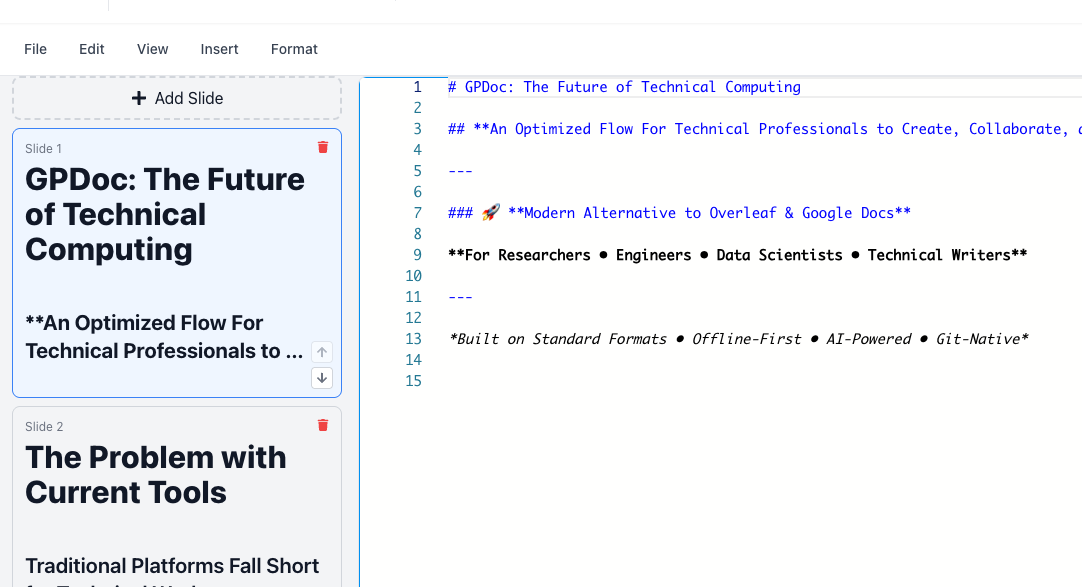
Create a deck
Choose Slides from the GPDoc file picker or Maker. Add a slide with the plus control in the slide list.
Add headings, lists, links, images, tables, code, LaTeX math, or Mermaid diagrams. Each item in the slide list owns one Markdown source string.
Use source, preview, or split view to compare Markdown with the rendered slide. Use presentation mode for the full deck.
Export a local presentation, create a provider-native copy, or share the GPDoc source for review.
When a deck is exported as Markdown, GPDoc separates slides with --- so other Markdown presentation tools can identify slide boundaries.
Import and export PowerPoint
- Open File > Import and select a Microsoft PowerPoint (
.pptx) file to create a GPDoc slide deck from supported slide content. - Open File > Export and choose Microsoft PowerPoint to create a
.pptxdestination copy.
PowerPoint conversion is not lossless. Review fonts, layout, media, speaker notes, animations, and unsupported objects in the exported file.
Work with Google Slides and Microsoft 365
Connected provider workflows can import or export supported Google Slides and Microsoft PowerPoint content. Use the applicable File import or export action, select the authorized Google or Microsoft account, and review the provider-native copy after conversion.
A Google Slides or Microsoft PowerPoint copy remains a separate provider file. It does not replace the Markdown-backed GPDoc source unless you explicitly import or update through a supported linked workflow.

Surface boundary
Editing, import, export, provider, and presentation controls can differ across the web app, Apple apps, VS Code, and compatible IDEs. Use the controls visible on the current client.
Next guide
Run Python and TypeScript notebooks
Create Markdown, TypeScript, and Python cells, then import or export Jupyter Notebook files.